Venue helper guide
No technical background needed. One helper per room; follow this page.
If something goes wrong
Do what the page says first, and touch nothing else. If a line makes no sense, ask the Ask AI button at the bottom right of the ingest page; if that does not solve it, email support@365ui.com with the room name and the line on the page.
First: how this room is set up
- The organizer chose a setup for each room on the event page; if you do not know which one yours is, ask the organizer first.
- The venue mixer: the venue AV team gives you one cable from the mixer, which goes into the USB sound card. See Wiring (a room on the mixer) below.
- Speakers wear mics: a quiet room with no mixer and no AV. See No mixer: speakers wear mics below; if a phone listens instead of a laptop, see No mixer: one phone.
- The sound plays on a web page on this laptop (a webinar, a livestream): see No mixer: sharing a tab’s sound below.
- An online meeting: in a room held entirely on Zoom, Google Meet or Teams, our bot 365UI 同传 · Live interpretation joins by itself 5 minutes before each session and takes in the sound; no laptop and no wiring. The host only has to admit it from the waiting room or lobby, and should not click Report on it. If the bot cannot get in, we email you why; in a hurry, use No mixer: sharing a tab’s sound below.
Wiring (a room on the mixer)
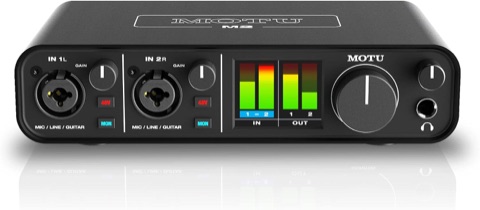 MOTU M2 USB audio interface
One per room. Works on a Mac as soon as it is plugged in; no driver to install.
amazon.com/dp/B0812B26TN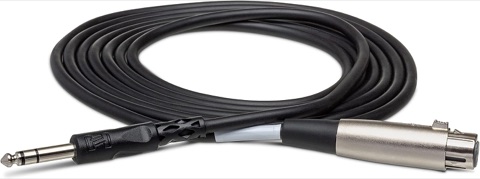 Hosa STX-110F cable (10 ft)
One per room: one end to the mixer’s XLR male line output, the other into the interface. If that output is 1/4" TRS, buy a balanced TRS male-to-male cable instead.
amazon.com/dp/B000068NYU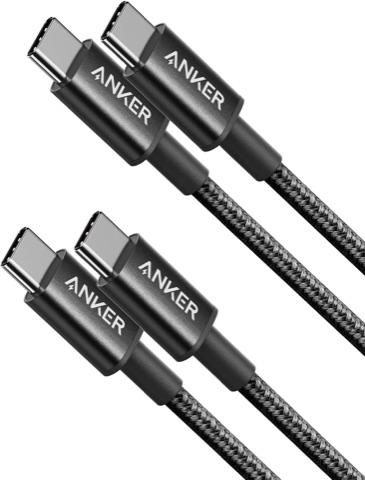 Anker USB-C to USB-C cable (2-pack)
The M2 comes with a USB-C to USB-A cable only. If the laptop has only USB-C ports (every recent MacBook), use this instead of an adapter; one pack covers two rooms. Not needed if the laptop has a USB-A port.
amazon.com/dp/B088NMR44C
- Plug the sound card's USB cable straight into the laptop — no dock, no adapter; if the laptop has only USB-C ports, use the USB-C to USB-C cable. Plug the laptop in and keep the lid open all day.
- Turn on the power switch on the back of the sound card.
- Plug the cable from the mixer into the centre hole of input 1 or input 2 on the front.
- On the sound card the 48V and MON buttons are both unlit; turn the GAIN knobs all the way down.
Getting started
- On the day, open it within an hour before the session, and it stays connected through to the start. For events booked online, open it earlier and the room may run a 15-minute check and close, then open again 30 minutes before the session; leave the page open and it reconnects.
- Open Chrome and click this room's bookmark (it is named after the room).
- Press “Allow microphone”, then choose Allow while visiting the site when Chrome asks; not Allow this time, which Chrome takes back once the lid has been closed.
- On a Mac, if the page says “On a Mac, also turn on: System Settings → Privacy & Security → Microphone → Google Chrome”, do that and reload the page.
- If the page says “The microphone is blocked: click the icon at the left of the address bar → Site settings → Microphone → Allow, then reload this page”, do exactly that.
- On Windows, if the page says “On Windows, also turn on: Settings → Privacy & security → Microphone”, turn on both switches it names, then reload the page.
- When the page says “Choose the USB sound card from the mixer, then the input”, pick the sound card by name (MOTU M2), then the input whose bar moves.
- “Remote hasn't joined this room yet — keep it plugged in and wait” means just that; no need to call.
- For events booked online the page says “The room is starting by itself, usually within a minute — keep it plugged in and wait”: wait the same way, and if it is still there after three minutes, call the number at the bottom of the page.
- At the precheck before the event: once the page says it is sending, scan the room’s attendee QR code with a phone to hear what the interpretation sounds like (up to 5 phones a room during a precheck).
No mixer: speakers wear mics
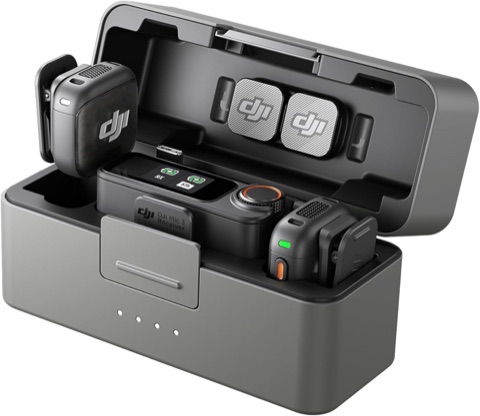 DJI Mic 3 wireless lavalier mics (two transmitters, one receiver)
Either this or the USB mic below, one per room; choose it when speakers stand or move around, or there are more than two. Speakers clip a transmitter to their collar; the receiver goes straight into the laptop with the USB-C cable in the box, set to mono (M mode). For more than two speakers, add transmitters: up to 4 per receiver.
amazon.com/dp/B0F995J8FR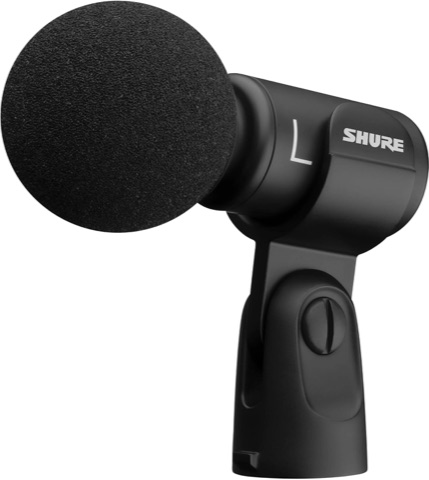 Shure MV88+ USB microphone (on the table)
Either this or the lavalier mics above, one per room; it suits one or two speakers seated at a table, each within arm’s length of it. It plugs straight into the laptop with the USB-C cable in the box (10 ft). The box has a mic clip but no stand: to stand it on the table, add a desktop mic stand (5/8" thread).
amazon.com/dp/B09BZXP8Y1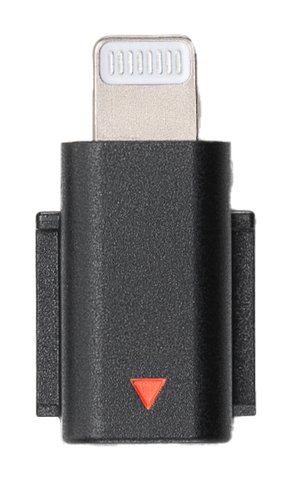 DJI Mic 3 Mobile Phone Adapter (Lightning)
Needed only when the receiver plugs into an iPhone or iPad with a Lightning port and our app 365UI Interpretation Audio sends the sound, one per room; an iPhone or iPad with USB-C, or a laptop, does not need it. It fits the DJI Mic 3 only; for another mic, buy its own maker’s Lightning adapter.
amazon.com/dp/B0F98TG92R
- Only for a room the organizer put on mics (a quiet room); a room on the mixer is wired as above.
- Wireless lavalier mics (a DJI Mic 3, say): plug the receiver straight into the laptop with the USB-C cable in the box and set it to mono (M mode); each speaker clips on a transmitter about a hand’s width from the mouth, switched on and not muted. A USB mic (a Shure MV88+, say) also plugs straight into the laptop with the USB-C cable in its box; stand it on a desktop mic stand facing the speakers, each of them within arm’s length of it.
- Audience questions: hand a transmitter (or mic) over, or ask the host to repeat the question; sound the mics do not pick up is not interpreted.
- When the page says “Choose the speakers’ mic or its receiver”, pick the mic or receiver by name, speak into it until its bar moves, then press “Start with this” below.
- Soundcheck: when the page says “Have everyone who will wear or hold a mic (including the audience-question mic) say one sentence in turn now, and leave the gain alone”, have each speaker say a sentence in turn. When the page asks for louder or quieter, it means how far the mic is from the mouth (or the gain on the mic or its receiver); then press “Measure again”.
- During the session, if the page says “Remote is connected but not hearing speech — check the mic (or transmitter) is on and not muted, and the USB receiver is pushed in”, do exactly that.
- At a break, press “Start a break (pause interpretation)” on the ingest page, and “Break over, carry on” before the next talk; at the end, press “Stop sending”. With the mics on and neither pressed, private chat nearby gets interpreted and goes into the transcript.
No mixer: one phone
- Only for a room the organizer put on mics (or a phone): the phone stands in for the laptop, set in front of the speaker, and its own microphone listens.
- Use a phone just for this: turn on Do Not Disturb, and don’t use it for messages or conversations while it sends.
- Mind the phone’s battery: sending runs it down fast, so for a long event keep it plugged in (on a wireless charger if a mic is in its charging port). On Android the audio page warns when the battery runs low; a browser on an iPhone cannot see the battery and does not warn.
- On an iPhone, use Safari to open this room’s audio link (Safari keeps listening when the screen locks or another app is in front; an external mic in an iPhone browser records the phone’s own microphone instead, so use our app 365UI Interpretation Audio for external mics (its guide is linked below), or a laptop); on Android, use Chrome.
- Pick the phone’s own microphone (iPhone Microphone on an iPhone, Speakerphone or Headset earpiece on Android), then press “Start with this”.
- Lay the phone flat on the table in front of the speaker, within half a metre of their mouth, the closer the better, with the microphone holes at its bottom edge uncovered. On an iPad the microphones are on the top edge (the camera end), not the bottom: point the top edge at the speaker and keep a case from covering it.
- Soundcheck: the speaker says a few sentences towards the phone; once it passes, sending starts, with no quiet step.
- On an Android phone, don’t lock the screen or switch apps while it sends: the audience hears nothing while the screen is locked or another app is in front, until you come back to the audio page. An iPhone in Safari keeps listening with the screen locked or another app in front, but don’t close the audio page or swipe Safari away.
- If the phone is held in the hand as the mic, press Touch guard on the page once it sends: the screen goes black, touches do nothing, the screen does not time out, and sending carries on. To use the page again, slide the round knob right to the end.
- At a break, press “Start a break (pause interpretation)”, and “Break over, carry on” before the next talk; at the end, press “Stop sending”.
No mixer: sharing a tab’s sound
- Only for a room whose sound plays in a tab in Chrome on this laptop (a webinar, a livestream or an online meeting, say). A room with a mixer does not use this; wire it up as above.
- When the page asks you to choose the audio device, press “Share a tab’s sound”.
- In Chrome’s pop-up choose Chrome Tab (not a window or the whole screen), click the tab that plays the sound, tick Also share tab audio, then press Share.
- The soundcheck only checks speech: when the page says “Have the shared tab play someone speaking now, and leave the volume alone”, let it play speech (in an online meeting, have someone in it say a few words). Once it passes the page starts sending; there is no need to pause the tab.
- When the page asks for a volume change, it means the volume in that tab’s own player, not the computer’s volume keys; once it passes, leave the player’s volume alone.
- All day, do not close the shared tab or press the stop button on the sharing bar Chrome shows. After reloading this page you have to press “Share a tab’s sound” again.
- A room held entirely on Zoom, Google Meet or Teams normally has our bot in the meeting and does not need this; use it when the bot cannot get in, or when the meeting runs on another app such as Tencent Meeting or VooV. When the sound is an online meeting (Google Meet, or Zoom, Teams, Tencent Meeting or VooV on the web): join it in Chrome on the audio laptop with the microphone off, then share that meeting tab. The tab carries everyone except this laptop, so it cannot be the speaker’s own laptop.
- Turn the audio laptop’s volume down to 0, or plug in headphones: meeting sound played out loud is picked up by phones and laptops nearby and sent back into the meeting as an echo, which upsets the soundcheck and the translation. The shared tab’s sound does not depend on the computer’s volume.
- When a second device joins the same Meet with the same Google account, choose Other ways to join → Join here too; Switch here pushes the first device out of the meeting.
Online meetings: captions inside the meeting
- When the event also runs in Zoom or Teams (people joining online want captions too, or the whole event is online), the captions of one language can show inside the meeting, so attendees there need no listening page.
- Zoom needs a one-time setting: at zoom.us, under Settings → Meeting → In Meeting (Advanced), the host turns on Manual captions, ticks Allow use of caption API Token to integrate with 3rd-party Closed Captioning services and saves; without it the menu below is missing from the meeting.
- Each Zoom meeting: the host or a co-host does this. Once the host has started it in the desktop app (the web app has no option to copy the address), Host tools in the toolbar → Captions → Use a third-party CC service → Copy the API token, and send you the address. A restarted meeting needs a new one.
- Or skip copying: under “Send captions into an online meeting” on the audio page, enter the Zoom meeting number and press “Get it with a Zoom sign-in”; in the window that opens, the host authorizes with their own Zoom account and the address fills in. It uses the host’s account, so the host has to be there for this step.
- Once third-party captions are on, Zoom’s own automated and translated captions stop for that meeting; only one of the two can run. If the organizer was relying on Zoom’s translated captions, agree with the host first.
- Teams: the organizer or a co-organizer does this, best before the meeting so you get the link early and can test it: Calendar in Teams, double-click the meeting, Options → Accessibility, turn on Provide CART captions and select Apply; the link only shows when you open it again. Copy it and send it to you. In the meeting it works the same from Controls → View more options → Accessibility. More → Settings → Accessibility settings is a personal setting and does not have this. Once the meeting starts, turn on live captions under More.
- Webex: the host does this, in the web or desktop app, on a paid Webex account (a free one gives out the link, but captions sent to it never show), so try it before the event. Once the meeting has started, the arrow next to Show closed captions → turn on Allow manual captioning → in the list that opens, make the host the captioner → Copy the caption link, and send you the link. Attendees see the captions once they press Show closed captions.
- While the audio page says it is sending, open “Send captions into an online meeting” below it, paste the address, choose the caption language and press “Start sending captions”. The page says how many lines went; if it says the meeting has not started, ask the host to start it.
- A Zoom, Teams or Webex meeting shows captions in one language; anyone who wants another uses the listening page.
- In an online-meeting room where our bot joins to take in sound, no audio page needs to stay open: the organizer can paste the caption address directly under On the day on the event page to send captions into the meeting; attendees can also use the QR code on the bot’s video or the link it posts in the meeting chat to listen and read captions in every language.
- Google Meet works too, but it takes no outside captions, so share a screen instead: in the meeting, Share screen → A tab, and pick this room’s venue display page (linked on the event page). People online then see the same captions as the venue screen; the display page makes no sound, so it does not play over the meeting. Zoom and Teams can do this too, and then it is not limited to one language.
- While the display page is shared, nobody else can share slides at the same time. If the speaker shows slides in the meeting, post the listening page link in the meeting chat instead. Other meeting apps (Tencent Meeting or VooV, say) can share the display page too; if the web version cannot share a screen, share the Chrome window from the desktop app. Try it before the event.
One screen: captions under the slides
When the room has one screen and the slides come from one computer, install the 365UI Captions app on the computer that shows the slides (Mac or Windows, free): the captions float at the bottom of the slide show, white with a black outline on a transparent background, like a film’s subtitles. Clicks go through them and they never take the keyboard, so the clicker works as usual. The app makes no sound.
- Mac (Apple silicon: M1 and later)Apple menu → About This Mac: pick this if it says Chip Apple M…
- Mac (Intel)Pick this if it says Processor Intel
- Windows: Microsoft Store (recommended)Install it from the Store and it opens with no security warning; for both ordinary and ARM computers
- Windows zip (most computers)For computers that cannot install Store apps (a work computer with the Store turned off, say): unzip and double-click 365UI Captions.exe; nothing to install, no administrator rights
- Windows zip (ARM, e.g. Surface Pro X, Snapdragon laptops)As above
- The first time you open it: on a Mac, macOS asks whether you are sure you want to open an app downloaded from the internet: press Open; after that a double-click is enough. On Windows, if you installed it from the Microsoft Store, open 365UI Captions from the Start menu; no security warning comes up. With the zip, unzip the whole folder first, then double-click 365UI Captions.exe: a blue Windows protected your PC window comes up with only Don’t run on it; do not press that, press More info → Run anyway. If Windows asks Do you want to allow public and private networks to access this app? the first time you paste a captions link, press Allow. Each of these comes up only once.
- Try it before the event, no event link needed: the captions icon at the top right of the menu bar (on Windows, the tray at the bottom right) → Demo captions shows Chinese and English captions rolling at the bottom of the screen. Start the slide show and check that they stay on top and the clicker still turns the slides; in the same menu, set Show on screen, Position and Text size (seven sizes). The settings are remembered.
- On the day: copy this room’s big-screen captions link (on the event page; the organizer can send it to you), then the captions icon → Paste captions link. The first line of the menu is the status: Connected: captions appear when someone speaks means it is ready. The captions show the room’s first two languages, as the venue screen does.
- On a laptop driving a projector, the app puts the captions on the projector by default; if the slide show is on the laptop’s own screen, change it under Show on screen.
- Cannot find the captions icon (a full Mac menu bar hides some): open the app again and its window comes up. 语言 / Language in the menu switches it to Chinese.
- If that computer may not install software: open the caption bar link from the event page in Chrome or Edge, press Open the caption bar and drag it under the slides. The bar has a black background, is at most four fifths of the screen wide, and its tab has to stay open.
- The app keeps only the captions link and its display settings on that computer, and collects nothing else.
Soundcheck
- When the page says “Have each mic that will be used (including the audience-question mic) say one sentence in turn now, and leave the knobs alone”, ask AV for a sentence from every mic, including the audience-question mic.
- If the page asks you to turn a GAIN knob, turn only the one it names, then press “Measure again”. If it offers “Switch to input 1” or “Switch to input 2”, press it.
- When it says “Everyone stop talking now and leave the mics on”, ask the room for a few seconds of silence. If it still hears sound, do what it says: “ask AV what this feed carries, and don't touch GAIN”.
- Once you see “Soundcheck passed” you are done; leave everything as it is.
During the session
Never close the lid or this page, and keep the laptop on power. The page keeps saying “Don't close the lid or this page”.
| The page says | What you do |
|---|---|
| “Remote hears you clearly” or “No speech right now (normal when nobody is talking)” | Both are fine; nothing to do. |
| “The sound card disconnected” or “The mic or its receiver disconnected” | Plug it back into the same USB port; the page picks it up by itself. If it never came out (say, after the lid was closed and opened again), unplug it and plug it back in. |
| “Chrome took back microphone access” | When Chrome shows its window, choose Allow while visiting the site and the page picks the card up by itself; if no window shows, press “Allow microphone”. |
| “The shared tab was closed or sharing was stopped” | Press “Share a tab’s sound” and pick that tab again, then follow the page. |
| “Venue network is down” | Do what the page says: sign in to the Wi-Fi again, or join the backup hotspot; it reconnects itself. |
| “This room is already being sent from another tab — close this one” | Close the tab showing this line and leave the other one alone. |
| A line asking you to turn a GAIN, or the speaker to come closer to the mic or move away from it | Do it a little at a time, and stop once the page is back to “Remote hears you clearly”. |
Get help right away
- “Another device took over this room. If that wasn't you, ask the organizer right away to replace this room's audio link on their event page”: once they have, open the new link in Chrome on this laptop.
- “This audio link has expired — ask the organizer for the latest audio link”: the latest link is on their event page; open it in Chrome on this laptop (once it has been opened, the bookmark works again).
- “Reconnecting” for more than two minutes.
- Anything on the page you do not understand.
Breaks and lunch
- When a session ends and people go for a break or lunch, press “Start a break (pause interpretation)”: nothing is interpreted or recorded meanwhile, listeners hear silence, and the chatter stays out of the transcripts. Leave the cables and the page as they are.
- It has taken effect once the page says “the remote has paused interpretation and recording”; press “Break over, carry on” before the next talk, or none of it is interpreted.
Moving rooms or finishing
- At the agreed time, press “Stop sending”.
- Wait for “Stopped — you can close the lid and unplug”, then close the lid and unplug.
- In the new room: wire up as above, open the new room's bookmark, choose the sound card and the input, and redo the soundcheck.
See also
AI assistant
Hi, I’m the 365UI AI assistant. I answer from our interpretation site, its guides and our company site, 365ui.com, and you can ask follow-ups. Try:
I do not answer questions about anything else, and I cannot look up an order or an event; for those, write to support@365ui.com.
We keep conversations for 90 days to improve the answers, without your IP address; see the privacy notice.