Live interpretation in 14 languages, on attendees’ own phones

Used at the CEIBS 2026 Global Alumni Reunion in New York and the My Healthcare Forum in Toronto →

  • No booth
  • No receivers
  • No interpreters
  • No app for attendees
  • Public prices, no quote
  • Order online, live in minutes
  1. Send in the room or meeting audioMixer or mic to a laptop, a phone on the lectern, or a Zoom / Meet / Teams link
  2. Attendees scan the QR code in their browser
  3. Put on headphones for live voice, with captions on phones and screens
  • 13 AI voices to choose from, or each speaker’s own voice
  • Bilingual captions on the big screen. One screen only? Over the bottom of your slides, like film subtitles
  • In-person rooms and Zoom, Google Meet and Teams meetings alike
  • Transcripts in every language, video subtitles and highlights, plus optional speaker-labeled transcripts and refined translations
What to prepare & pricingBook now

From $100 per room-hour with translated voice ($25 captions only), 100 listeners included, no base fee

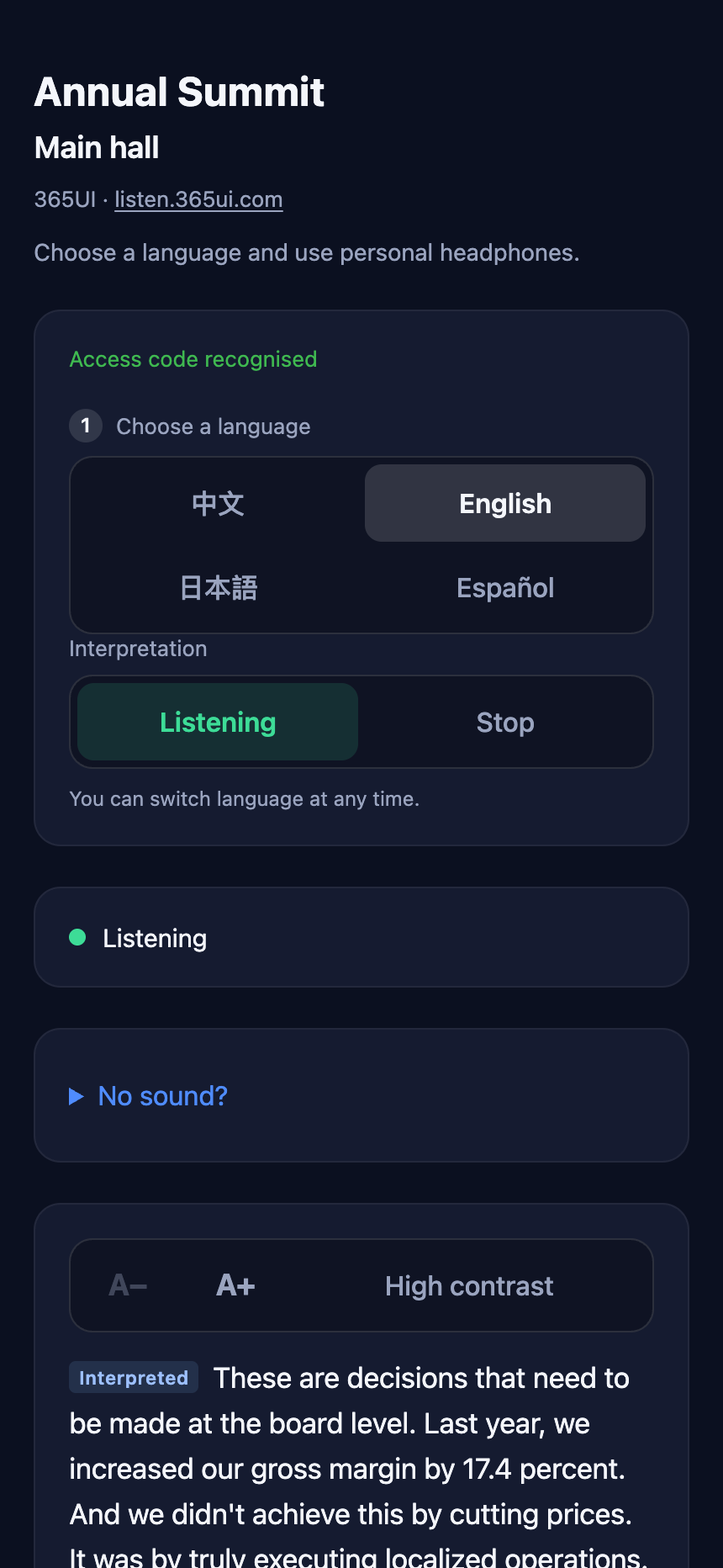
The listener page on a phone: language, audio and captions

How it works

  1. 1

    Connect one audio feed

    Pick whichever setup fits the room; for an in-person room an on-site helper opens a web page and runs the on-screen soundcheck once, and an online meeting needs neither a laptop nor a helper.

    • Room with a mixer: connect one line-level output from the venue mixer to a laptop through a small USB audio interface.
    • Room with no mixer: speakers wear wireless lavalier mics, or a USB mic sits on the table, plugged straight into the laptop (a wireless lavalier receiver can also plug into an iPhone or iPad running our free app 365UI Interpretation Audio).
    • No laptop at all: set a phone within half a metre of the speaker to take in the sound.
    • Zoom, Google Meet or Teams meeting: paste the join link, and our bot joins 5 minutes before the start to take in the sound; attendees scan the QR code on its video, or open the link it posts in the meeting chat.
  2. 2

    Real-time AI interpretation in the cloud

    One channel for each language you choose per room (1–14 of 13 spoken languages), with live voice and captions, backed by primary and standby engines that switch over automatically if one has an issue. Cantonese is also offered, as captions only: no voice and no standby engine.

  3. 3

    Attendees scan and listen in their browser

    No app to download or install — attendees scan the venue QR code, choose a language, and put on headphones for live audio and captions. When a speaker is already using their language, they hear the speaker directly. The venue projector can show the captions too.

  4. 4Optional

    Highlights and transcripts afterwards

    After the event, each room gets highlights in every listening language: a summary, key points, and quotes from the captions.

    See a speaker-labeled sample →
    • Check and publish with one click; attendees scan the same QR code to read them, with your registration or newsletter link at the bottom.
    • Download transcripts in every language and see audience numbers on your event page.
    • Turn a transcript into a subtitle file (SRT or WebVTT) for your recording: pick a language and the time the video starts. The times are estimated from when each caption appeared on screen, so check them after importing.
    • Add a speaker-labeled transcript, split by speaker: $20 per room-hour, at most $120 a day.
    • A room with the speaker-labeled transcript also gets a refined translation afterwards: the transcript is translated again in blocks, with the whole session as context, into each listening language, for download, included in the transcript’s price; afterwards you can pick other languages on the event page and get them translated too, free of charge. Machine translation, not proofread by a person.

Hear it

It opens with English on stage and everyone else listening in their own language; switch the speaker to Mandarin, Cantonese or any of the languages below. Pick a language to hear what an attendee on that channel hears. The Mandarin welcome is synthesized speech; the others are real recordings published openly, credited under the text, and neither the speakers nor the publishers have anything to do with 365UI. Every channel is the engine’s live output, unedited.

On stage, speaking

What attendees hear

The interpretation starts about two seconds behind the speaker, as live interpretation does; the quiet voice underneath is the speaker. Switching languages while it plays carries on from the same moment.

What the speaker saysI want to thank our entire team across this nation and around the world who gave every ounce of ingenuity and effort to make this mission successful. I am so proud of each and every one of you, what you have achieved over the last 10 days. NASA has shown that ambitious goals are worth pursuing and can inspire the world. We are so thrilled to have Reid, Victor, Christina, and Jeremy back here on Earth and safely aboard the USS John P. Murtha. Our team is fired up, and this mission, as we've been talking about, is just the beginning. To all of our new followers out there, please stay tuned. This is the first mission, our first mission to the moon, of many more to come. And we can't wait. Our teams are so ready to get to work on the next missions and explore the lunar surface and bring the world along with us.

Recording: Dr. Lori Glaze’s remarks at NASA’s “Artemis II Post-Splashdown News Conference” (10 April 2026); public domain in the United States. 365UI took an excerpt and evened out the loudness, and, as for a customer’s event, prepared a glossary from the speaker list (the names and the ship she mentions). Original recording

The three things live interpretation most often gets wrong

The number under each card is one we measured ourselves, with the same script and the same scoring for every run.

  1. Names, titles and organizations

    Pinned to the speaker list and glossary you give us; before the event each term is said in a new sentence through the engine, and the ones to reword are marked.

    A guest introduction read by a real speaker: 18 of 19 names, titles and organizations right, and all 5 names kept in their own spelling.

  2. Chinese and English mixed on stage

    Each sentence is checked for its language; when the speaker already speaks a channel’s language, that channel plays the speaker instead of repeating it.

    In a four-language room with each of 11 added languages, no added channel was once muted as if the speaker spoke it; three recordings that change speaker and language were all judged right.

  3. Something goes wrong mid-event

    Two translation engines switch over on their own; another server takes over if one fails; you get an email when the venue sound stops reaching us; past 5% of a session lost on our side, the service works out the refund and we pay it, with no claim to make.

    Engine switch-over measured at 363 ms; with the server stopped, another one had the room up in 4 minutes and listeners heard sound 7 seconds later.

Bilingual captions on the venue screen

Open the screen link on the computer connected to the projector: captions in two languages fill the screen, with no sound. Attendees without headphones or a phone just look up.

美国宇航局已经证明,宏伟的目标值得追求,并且能够激励全世界。

NASA has shown that ambitious goals are worth pursuing and can inspire the world

Powered by 365UI · listen.365ui.com

The screen partway through the sample passage
  • With the voice: a caption is never later than its interpreted audio, and usually appears with it.
  • Names and organizations are spelled from your event glossary, easier to read than to catch in a synthetic voice.
  • The language being spoken shows the speaker’s own words, the other shows the translation, so bilingual attendees can follow both.
  • For a live stream, the same captions go over your picture: add a Browser source in OBS or vMix, with a transparent background.
  • No extra charge, and the screen does not count as a listener.

One screen? Captions right over the bottom of your slides

Many rooms have one screen, with the slides shown from the presenter’s computer. Install the 365UI Captions app on that computer and the captions float at the bottom of the slide show like a film’s subtitles, on a transparent background. No AV crew, no OBS, no video switcher.

今年的重点,是把产品带到更多国家。

Our focus this year: more countries.

One screen: the slides from the presenter’s computer, captions along the bottom
  • Clicks go through the captions and they never take the keyboard, so the clicker keeps turning the slides; the app makes no sound.
  • Seven text sizes, and a higher position that clears a slide’s footer; it shows the room’s first two languages.
  • No event link needed to try it: choose “Demo captions” in the app and run your slide show against it.
  • For Mac and Windows, free; tested on a Mac with PowerPoint and Keynote in full-screen slide shows. On a computer that may not install software, pop out a caption bar from Chrome or Edge instead.

Download the app and how to use it →

On-device live captions: sound and text never leave the venue computer

Bilingual captions for one screen can be done entirely on the venue computer: open the page in Chrome or Edge on that computer, and it listens to the microphone or the mixer, recognizes speech on the computer, translates in the browser and shows the captions on the screen.

The free and paid versions use the same recognition and translation and are exactly as accurate as each other, and both less so than the $25-per-room-hour captions service: of the 13 English names and terms in the same 13-minute Chinese talk, on-device live captions get 5 right, and the captions service 11 with no glossary, and it can follow yours.

Compared with traditional interpretation

Traditional interpretation

$8,000–15,000

per room per day, estimated from public quotes

  • A booth to build
  • Receivers to hand out and collect
  • Two or more interpreters rotating every 20–30 minutes

365UI Live Interpretation

From $100/hour

per room, with translated voice and captions; includes 100 listeners at once (tiers up to 4,500); $25/hour and up captions only; at most 6 hours ($600) charged a day; no base fee

  • Public prices: see the total online and order straight away, no quote or contract talks; ordering minutes before the start is still in time: the room opens a minute or two after you pay
  • No booth, no receivers, no interpreter scheduling
  • Attendees use their own phones and headphones, no app to install
  • Each room includes 100 listeners at once, with tiers up to 4,500; counted by the phones listening, not by attendance, and the venue screen does not count
  • Where captions are enough (a screen, online viewers, a small meeting), choose captions only: $25 per room-hour
  • One USB audio interface and cable per room, about $215–$226; in a room with no mixer, mics instead, about $219–$259; bought once and reusable; nothing to buy for a room in an online meeting

What’s included

Events that used it

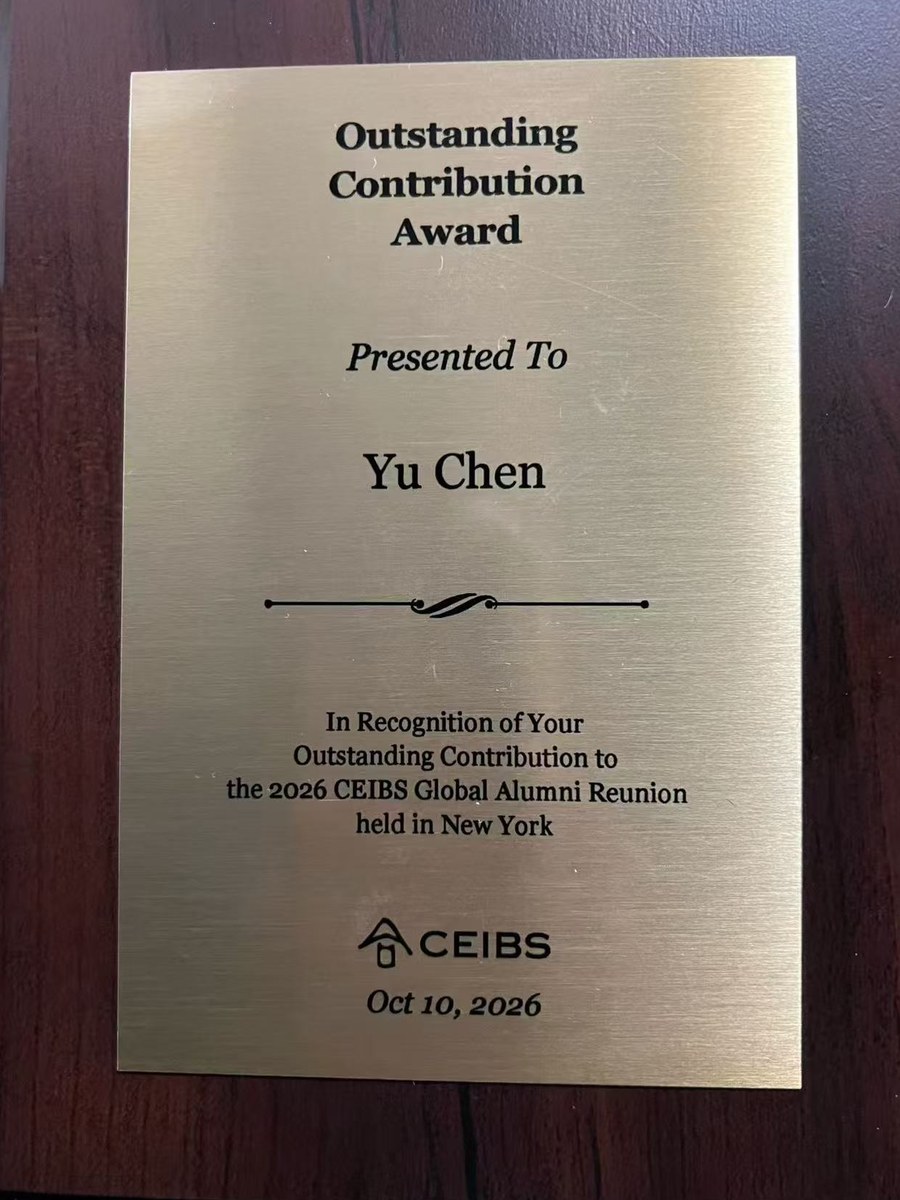
365UI began on a real bilingual stage in October 2026: invited to moderate and speak on the AI panel at the CEIBS 2026 Global Alumni Reunion in New York, founder Yu (Alex) Chen built the first phone-based prototype so guests more comfortable in Mandarin or English could follow every session effortlessly — earning warm praise from alumni, faculty and school leaders, along with the Reunion’s Outstanding Contribution Award plaque. Sitting in the audience that day, the head of The O Six Foundation heard it live, canceled the interpretation service already booked for their upcoming Toronto forum, and switched to 365UI. Back in the Bay Area, he turned that Mac-on-site prototype solo into a self-service cloud platform — running three simultaneous rooms in Toronto 19 days later without anyone flying to the venue.

CEIBS 2026 Global Alumni Reunion, New York

9–11 October 2026 (main forum 10 October)

Chinese–English interpretation for the whole day forum, which had both a talk in English by Harvard’s Professor Caroline Elkins and alumni panels in Chinese. No booth was built and no receivers were rented: guests who wanted the interpretation listened on their own phones and headphones. CEIBS reports that more than 150 alumni, school leaders and guests attended.

Across the more than seven-hour forum, traditional interpreter booths and receivers were gone: guests simply scanned a QR code on their own phones to hear smooth, accurate simultaneous interpretation. School leaders, professors and alumni from across the chapters praised how natural the voices sounded and how accurately speaker names and institutional titles came through; the head of another organization in the audience even decided on the spot to replace the interpretation provider already booked for their late-October forum in Toronto with this system. In appreciation of this innovative contribution, the Organizing Committee presented fellow alum Alex Chen with the Outstanding Contribution Award plaque.
— CEIBS New York Alumni Chapter · CEIBS 2026 Global Alumni Reunion (translated from Chinese)

Read the case study →

CEIBS news report (in Chinese) →
Outstanding Contribution Award plaque presented to Yu Chen at the 2026 CEIBS Global Alumni Reunion in New York
Outstanding Contribution Award plaque presented at the 2026 CEIBS Global Alumni Reunion in New York

My Healthcare Forum, Toronto (The O Six Foundation)

29 October 2026

Held at the Schulich ELC, York University, with Chinese–English interpretation in three rooms: the main hall in the morning, then two breakout rooms at the same time in the afternoon, three sessions back to back in each. Each room needed one laptop and a small USB audio interface on the venue’s sound desk; attendees listened on their own phones and headphones. After the event, every room received Chinese and English transcripts and highlights.

One laptop, a palm-sized USB audio device, a volunteer in each room, and a browser. That was essentially our setup. The 365UI team supported us remotely, while our main conference and six afternoon breakout sessions ran with live English–Chinese interpretation. Afterwards, we even received bilingual transcripts and meeting highlights.

For the first time, AI didn’t feel like technology standing between people. It felt like technology bringing people closer together.

— Annie Raines, Co-Founder, The O Six Foundation

Read the case study →

Guides

One page each for the organizer, the on-site helper, the venue AV team, and attendees — ready to forward directly to each person.

Guides

Book any time before your event starts — just have the equipment ready

Markdown