Organizer guide
Everything you need to do from ordering to the end of the event, step by step.
Good fit and poor fit
- Good fit: conferences, forums, summits, launches, and training sessions that need interpretation, in one room or several at once.
- Languages: each room takes 1–14 of 14 languages (Chinese, English, Spanish, French, Japanese, Korean, German, Portuguese, Italian, Russian, Vietnamese, Indonesian, Hindi, Cantonese), and speakers may use any of the room’s languages. Cantonese is captions only: listeners hear the room’s own sound, with no interpreted voice and no standby engine. When the stage speaks Cantonese, the other languages are translated as usual and the Chinese channel turns it into Mandarin; while the standby engine is in, the Chinese channel plays the speaker, with the Cantonese as written for captions. A room ordered captions only has captions alone in every language: the listener page opens on the captions with no sound, and the standby engine stays ready and gives captions only when it takes over. A captions-only room can also take 46 more languages (Arabic, Thai, Turkish, Malay, Dutch, Urdu, Norwegian, Swedish, Danish, Hebrew, Finnish, Polish, Icelandic, Czech, Filipino, Persian, Afrikaans, Asturian, Azerbaijani, Belarusian, Bulgarian, Bengali, Bosnian, Catalan, Cebuano, Greek, Estonian, Galician, Gujarati, Croatian, Hungarian, Javanese, Kazakh, Kannada, Kyrgyz, Latvian, Macedonian, Malayalam, Marathi, Punjabi, Romanian, Slovak, Slovenian, Swahili, Tajik, Ukrainian), priced like any other: they have no standby engine, so if the primary engine drops their captions resume once it reconnects; on the listener page everything but the language’s name is in English; and after the event they have no refined translation, highlights or “what was said so far”. We measured translation into them from Chinese and English; when the stage speaks one of them the other channels translate it as usual, but that is unmeasured.
- Accuracy limits: machine interpretation can make mistakes, so it is not suitable where every word must be exact, such as medical diagnosis, legal proceedings, or contract negotiation.
- Venue requirements: a venue with a mixer must be able to provide one line-level feed from it; in a room with no mixer, speakers wear wireless lavalier mics or use a desk USB mic. Mics suit quiet rooms with no sound system: speakers within arm’s length of a mic, a mic handed over for audience questions or the host repeating them, and mics switched off at breaks, or private chat gets interpreted too. Every room needs a reliable network.
- How attendees listen: on their own phones and headphones right in the browser, with no app to download or install.
- Online meetings: a session held entirely on Zoom, Google Meet or Microsoft Teams works too. Set that room up as an online meeting and paste the join link; our bot joins 5 minutes before each session and takes in the sound, with no laptop, helper or equipment. Attendees scan the QR code on the bot’s video, or open the link it posts in the meeting chat. The bot joins as a guest: if the company’s Teams or Google Workspace keeps out people outside the organization or anonymous guests, check with the meeting’s organizer first.
Preparation timeline (counted back from event day)
- Place your order and pay, any time before the event starts; the attendee QR signs and the access code are on your event page right away. Buy the equipment early: see the next step
- Right after ordering: choose on your event page how each room takes in sound (the venue mixer or mics the speakers wear), then buy what that needs, ideally a week ahead; choose at the latest 7 days before
- 5 days before: confirm the equipment has arrived; for rooms on the mixer, the venue AV picks the answers to a few connection questions on the AV link
- 4 days before: give the email addresses for system alerts and your recording retention choice; have one on-site helper for each room running at the same time
- 2 days before: enter the speaker list and glossary (if session times changed, change them on your event page); at the venue, run a soundcheck of about ten minutes by opening the room’s audio link from your event page, on the event laptops and audio interfaces (or mics)
- If you order after one of these steps, do it as soon as you can after ordering; finish the questions at least 2 hours before the event starts, when the rooms read them
- On the day: the helper opens the room’s audio link within an hour before the session, and it stays connected through to the start; each room opens by itself 30 minutes before each session and closes 15 minutes after it; if a session runs over by more, extend it under “Extend on the day” on your event page
What you need to prepare
- One laptop per room with Chrome (a personal Mac is easiest; avoid work laptops locked down by company IT), kept plugged in with the lid open all day
- Audio equipment for each room, bought once you know how the room takes in sound: a room on the venue mixer needs a USB audio interface and a cable, plus one line-level output from the venue’s AV team; a quiet room with no mixer needs a set of mics the speakers wear
- One on-site helper per simultaneous room (no technical background needed) to plug in the cable, open the web page, and turn one knob as prompted (in a room on mics, move a mic closer or further)
- A reliable room network; if the venue Wi-Fi uses a sign-in page, keep a phone hotspot as backup
- Speakers’ Chinese and English names, titles, and organizations 2 days before the event, plus the event’s own terms (organizations, sponsors, products, in Chinese and English; pasting from Excel works)
- A notice to speakers and attendees at the venue: the interpretation is done by AI and microphone audio is processed in the United States and Singapore. Put it on the opening slide, post it by the audience-question microphones, and have the host read it once at the start (ready-to-use text is on your event page)
How each room takes in sound: one of three
If the room’s microphones go into a venue mixer run by the venue’s AV team (a ballroom, an auditorium, a meeting room with a sound system), choose the venue mixer; for a quiet room with no sound system, choose speakers wearing mics or a phone; for a session held entirely on Zoom, Google Meet or Teams, choose an online meeting. Rooms in the same event can differ.
After ordering, choose for each room on your event page first, then buy what that choice needs, ideally a week ahead.
Not sure? Ask the venue two things: do this room’s microphones go into a mixer, and can the mixer give us one line-level output? If both are yes, use the mixer.
Equipment for a room on the venue mixer is about $215–$226; for a room with no mixer, mics instead are about $219–$259 (a wireless lavalier kit or one desk USB mic, either one; amazon.com prices on 2026-10-21). Bought once and reusable at later events. Check stock and delivery on the listings before ordering; in Canada, amazon.ca or Long & McQuade carry the same models.
The venue mixer: A venue with a mixer. Stage and audience-question microphones all come in, and speakers wear nothing extra.
- One MOTU M2 USB audio interface and one cable per room: a Hosa STX-110F (XLR female to 1/4" TRS male, balanced, 10 ft) for the mixer’s XLR male line output; if that output is 1/4" TRS, a balanced TRS male-to-male cable instead; if the laptop has only USB-C ports, also a USB-C to USB-C cable
- The venue AV team gives one line-level output from the mixer carrying all stage and audience-question microphones; after you order, each such room has an AV link on your event page to forward to them for the connection questions
- The on-site helper plugs in, opens the audio web page and turns one knob on the interface as prompted
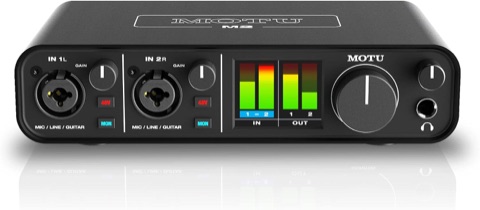 MOTU M2 USB audio interfaceAbout $199.95
One per room. Works on a Mac as soon as it is plugged in; no driver to install.
amazon.com/dp/B0812B26TN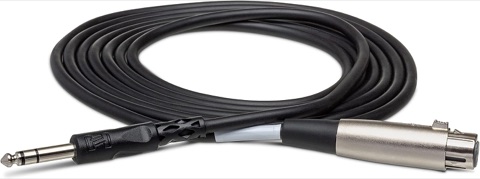 Hosa STX-110F cable (10 ft)About $15.46
One per room: one end to the mixer’s XLR male line output, the other into the interface. If that output is 1/4" TRS, buy a balanced TRS male-to-male cable instead.
amazon.com/dp/B000068NYU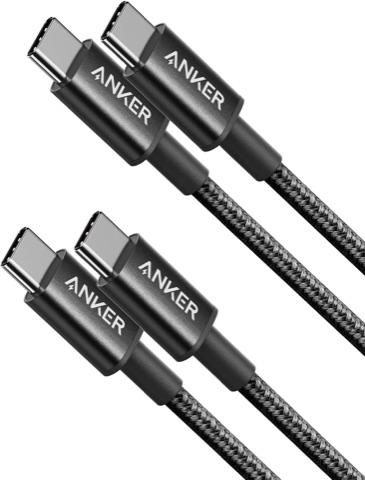 Anker USB-C to USB-C cable (2-pack)About $9.99
The M2 comes with a USB-C to USB-A cable only. If the laptop has only USB-C ports (every recent MacBook), use this instead of an adapter; one pack covers two rooms. Not needed if the laptop has a USB-A port.
amazon.com/dp/B088NMR44C
Speakers wear mics, or a phone listens (no mixer): A quiet room with no sound system; no venue AV needed. Either of these two mics, one set per room (a room taken in by a phone needs neither):
- One wireless lavalier mic kit per room (a DJI Mic 3, say, with the receiver set to mono, M mode, and up to 4 transmitters per receiver), one for each speaker; or, for one or two seated speakers, one desk USB mic (a Shure MV88+, say), each speaker within arm’s length of it
- To skip the laptop, use a phone instead, with nothing to buy: set it within half a metre of the speaker and let its own microphone listen, which suits one or two speakers; open the audio page in Safari on an iPhone or in Chrome on Android and keep it charging throughout; an Android phone must not be locked or switched away from while it sends, an iPhone may
- With no laptop and speakers on mics: plug the lavalier kit’s receiver into an iPhone or iPad and send through our app 365UI Interpretation Audio (free); a Lightning port also needs the mic maker’s Lightning adapter
- Audience questions need a mic handed over, or the host repeats them; sound the mics do not pick up is not interpreted
- Switch the mics off at breaks, or private chat nearby gets interpreted too
- The on-site helper plugs in the receiver or mic, opens the audio web page and moves the mics closer or further as prompted
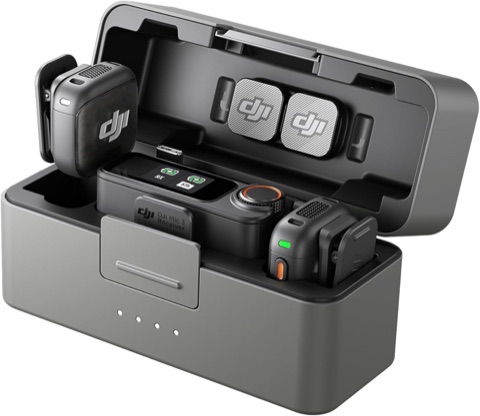 DJI Mic 3 wireless lavalier mics (two transmitters, one receiver)About $259
Either this or the USB mic below, one per room; choose it when speakers stand or move around, or there are more than two. Speakers clip a transmitter to their collar; the receiver goes straight into the laptop with the USB-C cable in the box, set to mono (M mode). For more than two speakers, add transmitters: up to 4 per receiver.
amazon.com/dp/B0F995J8FR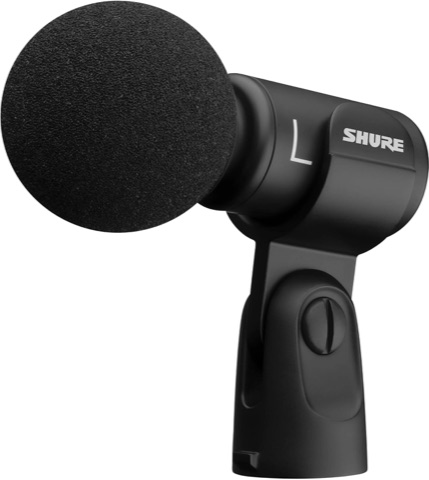 Shure MV88+ USB microphone (on the table)About $219
Either this or the lavalier mics above, one per room; it suits one or two speakers seated at a table, each within arm’s length of it. It plugs straight into the laptop with the USB-C cable in the box (10 ft). The box has a mic clip but no stand: to stand it on the table, add a desktop mic stand (5/8" thread).
amazon.com/dp/B09BZXP8Y1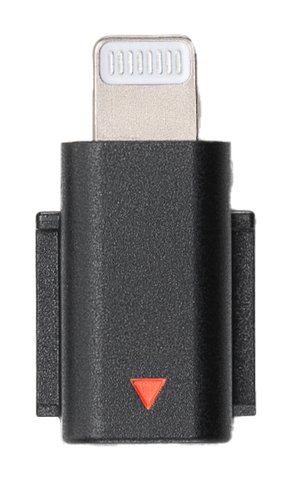 DJI Mic 3 Mobile Phone Adapter (Lightning)About $19
Needed only when the receiver plugs into an iPhone or iPad with a Lightning port and our app 365UI Interpretation Audio sends the sound, one per room; an iPhone or iPad with USB-C, or a laptop, does not need it. It fits the DJI Mic 3 only; for another mic, buy its own maker’s Lightning adapter.
amazon.com/dp/B0F98TG92R
An online meeting (our bot joins the Zoom, Google Meet or Teams meeting): A session held entirely on Zoom, Google Meet or Microsoft Teams. No laptop, no helper, nothing to buy.
- Paste the room’s full join link (a Zoom one with its pwd part) on your event page; the meeting runs in the room’s slots
- 5 minutes before each slot, our bot “365UI 同传 · Live interpretation” joins and sends the meeting’s sound to the cloud for interpretation; if it has to wait in a waiting room or lobby, the host admits it (Google Meet always asks)
- Please do not click “Report”: a reported bot may be banned by the meeting app and kept out of later meetings; to send it away, click “Remove”.
- The bot posts the listening link in the meeting chat and shows a QR code on its video; attendees pick a language on their phone or computer to listen and read captions, and turn the meeting app’s volume down
- The bot joins as a guest: if the company’s Teams or Google Workspace keeps out people outside the organization or anonymous guests, the bot cannot join, so check with the meeting’s organizer first; nor can it join a Teams town hall or live event, a meeting that requires registration, or a breakout room
- The bot itself records no video and Recall, the bot provider, keeps no recording; once the meeting’s sound reaches our interpretation, its recording and transcripts are kept as this event’s retention choice says, as for a room at a venue
- If the bot cannot get in, we email you why; a helper can also join the meeting in Chrome on a computer (Zoom’s web client, Google Meet or Teams on the web), open the ingest link and share that tab’s sound instead
The ways in, best first
- 1. The venue mixer: a MOTU M2 audio interface into a laptop (Mac or Windows). The steadiest, clearest sound; stage and audience-question mics all come in, and speakers wear nothing extra
- 2. No mixer: speakers wear wireless lavalier mics such as a DJI Mic 3, or a USB mic such as a Shure MV88+ sits on the table, plugged into a laptop
- 3. No laptop: a phone within half a metre of the speaker, listening with its own microphone. An iPhone in Safari has tested steady, and keeps listening with the screen locked or another app in front; Android phones differ a lot from model to model, so precheck with that very phone before the event, and don’t lock it while it sends
- 4. No laptop and the speakers move about: an iPhone or iPad with a wireless lavalier, in our app 365UI Interpretation Audio. The receiver plugs into the phone; if it comes out, the app sends silence and says so rather than using the phone’s own microphone
- 5. Not recommended: a mic plugged into a phone and used through a browser. On an iPhone, browsers (including Safari) record the phone’s own microphone instead, and the audio page refuses it; Android takes a while to find the mic, and the page cannot tell if it is unplugged
After you order
- Your confirmation email has the link to your event page. The link works like a password; please do not forward it.
- Answer the questions on your event page; answers save themselves, so you can fill them in over several sittings or with colleagues.
- First choose each room in the “How each room takes in sound: one of three” section of your event page, then buy what that needs, ideally a week ahead.
- For each room on the venue mixer, press “Create AV link” and send the link to the venue AV team; they see only that room’s questions. Rooms on mics the speakers wear need no AV, and the page does not list an AV link for them.
- To show your logo and your sponsors’ on the listener page and the venue screen, upload them in the “Logos” section of your event page (PNG or JPEG, one for you and up to 4 for sponsors, each under 150 KB): no extra charge. A removed logo can stay in the cache for up to 5 minutes, and all logos are deleted 30 days after the event.
- Before the event starts, tell speakers and attendees using the “Venue notice” text on your event page: put it on the opening slide, post it by the audience-question microphones, and have the host read it once at the start.
- If the event also runs in Zoom, Teams, Google Meet or the like, answer “Does the event also run online” on your event page: which room uses which, and who hosts or organizes the meeting. Only the host or organizer can get the caption address in Zoom and Teams (before the meeting in Teams, once it has started in Zoom), so agree with them beforehand that they give it to the on-site helper.
From two days before to the day
- Once you have paid, your event page has an “On the day” section: each room’s audio link (one per room), the attendee links and QR codes, the big-screen links, and attendee signs ready to print.
- 2 days before: on the laptop you will use on the day, with the audio interface and the mixer connected (or, in a room on mics, the mic receiver), open the room’s audio link in Chrome and run the soundcheck. The room opens by itself in about a minute; once the soundcheck passes, your event page shows that the precheck passed. Once the audio page says it is sending, scan the room’s attendee QR code with a phone to hear the interpretation (up to 5 phones a room during a precheck).
- During that soundcheck, save the audio page as a bookmark named after the room (not in an Incognito window: the bookmark works only in the Chrome that opened the link). Then send the link to that room’s helper.
- An audio link works like a key: send it only to the helper. If it leaks, press “Replace this link” next to it on your event page; the old one stops working at once. After replacing it, open the new link once in Chrome on that laptop; the bookmark stays as it is.
- For events you hold often, print the “Standing sign” once: for events ordered online while signed in, a room with the same name has the same attendee QR code every time, so book a later event from the same account with the same room name and the same sign opens it; if a sign is lost or must be retired, write to support@365ui.com.
- For events we deliver by hand, the event page has no “On the day” section: we send these links and the attendee signs from 48 hours before, the precheck link separately, and you write to support@365ui.com to replace a link.
On the day
- Within an hour before the session, each room’s helper follows the venue helper guide: plug in the interface or the mics, open the audio link and run the soundcheck; it then stays connected through to the start.
- Put the QR code signs at the entrance and on the seats; each sign also shows the access code for anyone who cannot scan.
- If the room has one screen and the slides come from one computer, the captions can sit under the slides like a film’s subtitles: install the 365UI Captions app on that computer, as the venue helper guide’s section on one screen explains.
- When an interpretation engine has problems, the system switches to the backup engine and reconnects on its own.
- For a room where you chose “What was said so far” on the form (the transcripts must be kept too), the listener page gets a panel of that name you can open: about every ten minutes a machine writes a few points, so someone who arrives late can read them and catch up. No extra charge, not published, and the page says it is machine-written and may be wrong.
After the event
- For events ordered online, the event page shows the most listeners each room had at once; if you chose to keep the archive, you can also download each language’s transcript there.
- For events ordered online that keep the archive, highlights in each listening language appear on the event page about ten minutes after a room stops (about an hour for rooms with a speaker-labeled transcript). Check them, take out anything you would rather not share, and publish; attendees then read them by scanning the same QR code. You can add your registration or newsletter link, and unpublish at any time.
- For rooms with a speaker-labeled transcript, a while after the transcript a “Refined translation” also appears on the event page: it translates the speaker-labeled transcript into each listening language using the whole session as context and your glossary, and you can download it; it is machine translation, not proofread. For other languages, tick them under “Translate into more languages” in the same place, at no extra charge.
- To subtitle your recording: in the transcripts area, open “Subtitles for the video”, pick a language, enter the time the video starts, and download an SRT or WebVTT file. The subtitle times are estimated from when each caption appeared on screen, not exact timecodes, so check them after importing.
- The archive is kept 30 days, then deleted; until then each room’s transcripts and venue recordings (lossless FLAC audio) can be downloaded from your event page.
- Prices are on the pricing page; cancellations and where the audio goes are on the What to prepare page.
See also
AI assistant
Hi, I’m the 365UI AI assistant. I answer from our interpretation site, its guides and our company site, 365ui.com, and you can ask follow-ups. Try:
I do not answer questions about anything else, and I cannot look up an order or an event; for those, write to support@365ui.com.
We keep conversations for 90 days to improve the answers, without your IP address; see the privacy notice.